Map Object
Map objects hold key-value pairs. Any value (an object or a primitive value) can be used as either a key or a value.
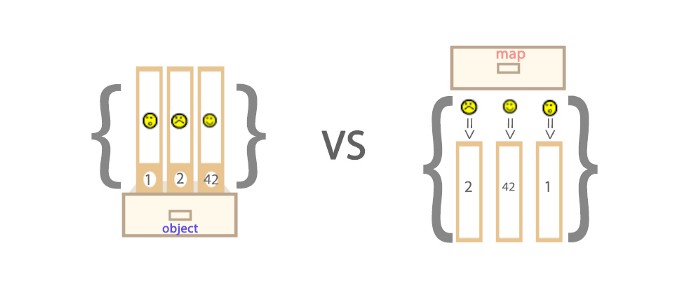
Difference between Maps and Objects
- The keys of an Object can only be strings or Symbols, but the keys of a Map can be any value.
- The key-value pairs in a Map are ordered (FIFO principle), whereas keys added to an object are not.
- The number of key-value pairs in a Map can be obtained from the size property, while the number in an Object can only be calculated manually.
- Objects have their own prototype, and key names on the prototype chain may conflict with the key names you set on the object.
Key in Map
The key is a string
var myMap = new Map();
var keyString = "a string";
myMap.set(keyString, "The value associated with the key 'a string'");
myMap.get(keyString);
myMap.get("a string");
The key is an object
var myMap = new Map();
var keyObj = {},
myMap.set(keyObj, "The value associated with the key keyObj");
myMap.get(keyObj);
myMap.get({});
The key is a function
var myMap = new Map();
var keyFunc = function () {},
myMap.set(keyFunc, "The value associated with the key keyFunc");
myMap.get(keyFunc);
myMap.get(function() {})
The key is NaN
var myMap = new Map();
myMap.set(NaN, "not a number");
myMap.get(NaN);
var otherNaN = Number("foo");
myMap.get(otherNaN);
Although NaN is not equal to any value, even itself (NaN !== NaN returns true), as a Map key, NaN makes no difference.
Iteration of Map
To iterate over a Map, the following two are the most powerful.
for...of
var myMap = new Map();
myMap.set(0, "zero");
myMap.set(1, "one");
for (var [key, value] of myMap) {
console.log(key + " = " + value);
}
for (var [key, value] of myMap.entries()) {
console.log(key + " = " + value);
}
for (var key of myMap.keys()) {
console.log(key);
}
for (var value of myMap.values()) {
console.log(value);
}
forEach()
var myMap = new Map();
myMap.set(0, "zero");
myMap.set(1, "one");
myMap.forEach(function(value, key) {
console.log(key + " = " + value);
}, myMap)
Operations on Map Objects
Conversion between Map and Array
var kvArray = [["key1", "value1"], ["key2", "value2"]];
var myMap = new Map(kvArray);
var outArray = Array.from(myMap);
Cloning a Map
var myMap1 = new Map([["key1", "value1"], ["key2", "value2"]]);
var myMap2 = new Map(myMap1);
console.log(original === clone);
Merging Maps
var first = new Map([[1, 'one'], [2, 'two'], [3, 'three'],]);
var second = new Map([[1, 'uno'], [2, 'dos']]);
var merged = new Map([...first, ...second]);
Set Object
Set objects allow you to store unique values of any type, whether primitive values or object references.
Special Values in Set
The values stored in a Set object are always unique, so it is necessary to determine whether two values are strictly equal. There are a few special values that need special treatment:
- +0 and -0 are strictly equal when determining uniqueness for storage, so they are not duplicated;
- undefined and undefined are strictly equal, so they are not duplicated;
- NaN and NaN are not strictly equal, but in a Set only one can be stored, so they are not duplicated.
Code
let mySet = new Set();
mySet.add(1);
mySet.add(5);
mySet.add(5);
mySet.add("some text");
var o = {a: 1, b: 2};
mySet.add(o);
mySet.add({a: 1, b: 2});
Type Conversion
Array
var mySet = new Set(["value1", "value2", "value3"]);
var myArray = [...mySet];
String
var mySet = new Set('hello');
Use of Set Object
Array deduplication
var mySet = new Set([1, 2, 3, 4, 4]);
[...mySet];
Union
var a = new Set([1, 2, 3]);
var b = new Set([4, 3, 2]);
var union = new Set([...a, ...b]);
Intersection
var a = new Set([1, 2, 3]);
var b = new Set([4, 3, 2]);
var intersect = new Set([...a].filter(x => b.has(x)));
Difference
var a = new Set([1, 2, 3]);
var b = new Set([4, 3, 2]);
var difference = new Set([...a].filter(x => !b.has(x)));