JavaScript splice()Method
Example
Add new elements to an array:
var fruits = ["Banana", "Orange", "Apple", "Mango"];
fruits.splice(2,0,"Lemon","Kiwi");
fruits.splice(2,0,"Lemon","Kiwi");
fruitsOutput:
Banana,Orange,Lemon,Kiwi,Apple,Mango
Try it Yourself »
Definition and Usage
The splice() method is used to add or remove elements in an array.
Note:This method changes the original array.
Return Value
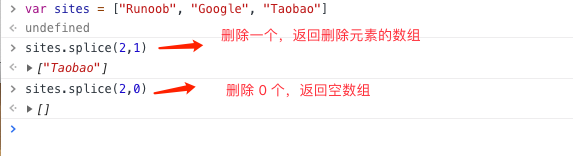
If an element is removed, an array containing that element is returned. If no elements are removed, an empty array is returned.
Browser Support
All major browsers support splice().
| Chrome | IE | Edge | Firefox | Safari | Opera |
| Supported | Supported | Supported | Supported | Supported | Supported |
Syntax
array.splice(index,howmany,item1,.....,itemX)
Parameter Values
| Parameter | Description |
|---|---|
| index | Required. Specifies where to add/remove elements. This parameter is the index of the array element where insertion and/or deletion begins. It must be a number. |
| howmany | Optional. Specifies how many elements should be removed. Must be a number, but can be "0". If this parameter is not specified, all elements from index to the end of the original array are removed. |
| item1, ..., itemX | Optional. The new element(s) to add to the array |
Return Value
| Type | Description |
|---|---|
| Array | If elements are removed from arrayObject, an array containing the removed elements is returned. |
Technical Details
| JavaScript Version: | 1.2 |
|---|
More Examples
Example
Remove the third element of the array and add a new element at the third position of the array:
var fruits = ["Banana", "Orange", "Apple", "Mango"];
fruits.splice(2,1,"Lemon","Kiwi");
fruits.splice(2,1,"Lemon","Kiwi");
fruitsOutput:
Banana,Orange,Lemon,Kiwi,Mango
Try it Yourself »
Example
Starting from the third position, remove two elements from the array:
var fruits = ["Banana", "Orange", "Apple", "Mango"];
fruits.splice(2,2);
fruits.splice(2,2);
fruitsOutput:
Banana,Orange
Try it Yourself »
Example: Remove a specified element from an array
const array = [2, 5, 9];
document.write(array);
const index = array.indexOf(5); // Remove element 5
if (index > -1) { // Remove the found specified element
array.splice(index, 1); // Remove element
}
document.write("<br>")
// array = [2, 9]
document.write(array);
document.write(array);
const index = array.indexOf(5); // Remove element 5
if (index > -1) { // Remove the found specified element
array.splice(index, 1); // Remove element
}
document.write("<br>")
// array = [2, 9]
document.write(array);
Try it Yourself »
Other Extensions