Swagger ドキュメント実例
以下は完全な Swagger ドキュメントの例であり、ユーザー管理システム API の詳細な仕様です。
このドキュメントはユーザー管理システムのAPIを説明しており、ユーザーの基本情報、認証サービス、データモデルなどを含んでいます。
この API は RESTful スタイルに従い、JSON 形式でデータ交換を行います。
Swagger Editor を使用してドキュメントをオンラインでテストできます。オンラインアドレス:https://editor.swagger.io/YAML または JSON をエディターにコピー&ペーストするだけで、右側のパネルに視覚化された API ドキュメントが表示されます。
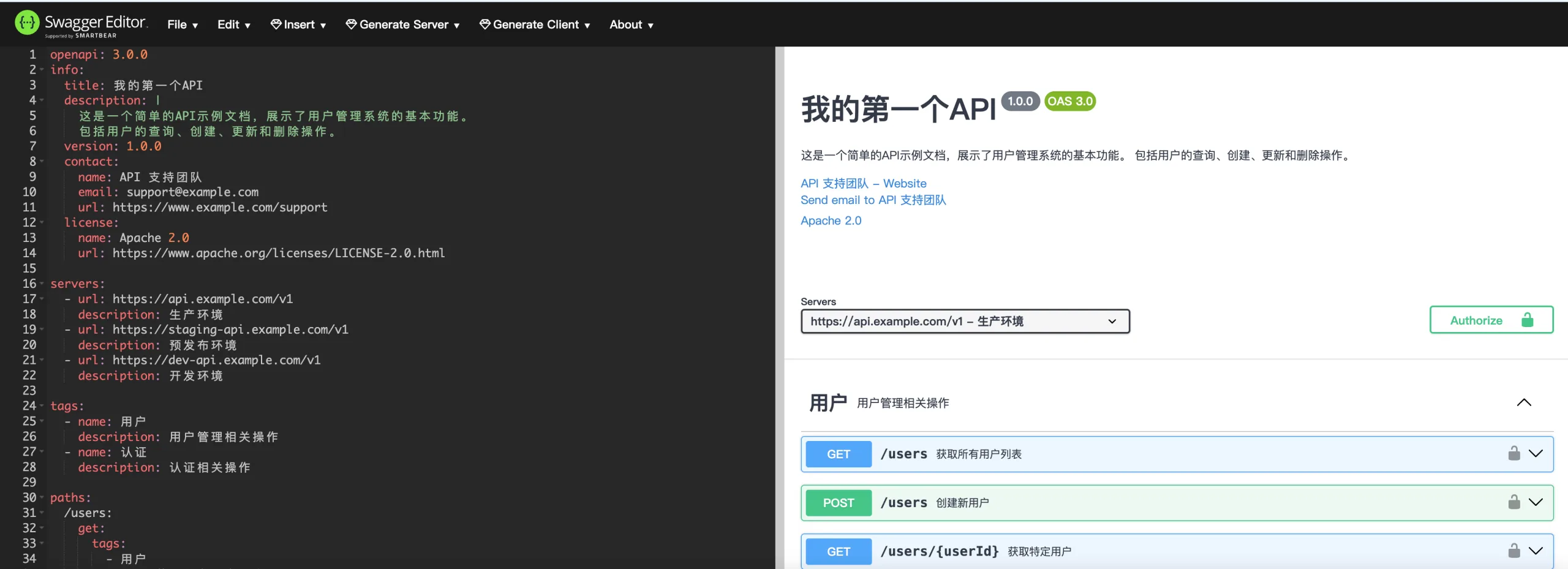
実例
openapi: 3.0.0
info:
title:私の最初のAPI
description: |
これはユーザー管理システムの基本機能を示す簡単なAPIサンプルドキュメントです。
ユーザーの検索、作成、更新、削除操作を含みます。
version: 1.0.0
contact:
name:API サポートチーム
email: support@example.com
url: https://www.example.com/support
license:
name: Apache 2.0
url: https://www.apache.org/licenses/LICENSE-2.0.html
servers:
- url: https://api.example.com/v1
description:本番環境
- url: https://staging-api.example.com/v1
description:ステージング環境
- url: https://dev-api.example.com/v1
description:開発環境
tags:
- name:ユーザー
description:ユーザー管理関連操作
- name:認証
description:認証関連操作
paths:
/users:
get:
tags:
-ユーザー
summary:すべてのユーザーリストを取得
description:システム内のすべてのユーザー情報を返します。ページングとフィルタリングをサポートします。
operationId: getUsers
parameters:
- name: limit
in: query
description:返される結果の最大数
required: false
schema:
type: integer
format: int32
minimum: 1
maximum: 100
default: 20
- name: offset
in: query
description:ページングオフセット
required: false
schema:
type: integer
format: int32
minimum: 0
default: 0
- name: status
in: query
description:ユーザーステータスでフィルタリング
required: false
schema:
type: string
enum: [active, inactive, banned]
responses:
'200':
description:ユーザーリストの取得成功
content:
application/json:
schema:
type: object
properties:
total:
type: integer
description:総ユーザー数
users:
type: array
items:
$ref: '#/components/schemas/User'
example:
total: 2
users:
- id: 1
username: "john_doe"
email: "john@example.com"
status: "active"
createdAt: "2023-05-01T12:00:00Z"
- id: 2
username: "jane_smith"
email: "jane@example.com"
status: "active"
createdAt: "2023-05-02T14:30:00Z"
'400':
description:無効なリクエスト
content:
application/json:
schema:
$ref: '#/components/schemas/Error'
'401':
$ref: '#/components/responses/UnauthorizedError'
security:
- bearerAuth: []
post:
tags:
-ユーザー
summary:新規ユーザーの作成
description:システムに新しいユーザーを作成します
operationId: createUser
requestBody:
description:ユーザー情報
required: true
content:
application/json:
schema:
$ref: '#/components/schemas/NewUser'
example:
username: "new_user"
email: "new_user@example.com"
password: "securePassword123"
responses:
'201':
description:ユーザー作成成功
content:
application/json:
schema:
$ref: '#/components/schemas/User'
example:
id: 3
username: "new_user"
email: "new_user@example.com"
status: "active"
createdAt: "2023-05-10T09:15:00Z"
'400':
description:無効なリクエスト
content:
application/json:
schema:
$ref: '#/components/schemas/Error'
example:
code: 400
message: 「メールアドレスの形式が正しくありません」
'409':
description:リソース競合
content:
application/json:
schema:
$ref: '#/components/schemas/Error'
example:
code: 409
message: 「ユーザー名は既に存在します」
'401':
$ref: '#/components/responses/UnauthorizedError'
security:
- bearerAuth: []
/users/{userId}:
parameters:
- name: userId
in: path
description:ユーザーID
required: true
schema:
type: integer
format: int64
get:
tags:
-ユーザー
summary:特定のユーザーを取得
description:IDに基づいて特定のユーザーの詳細情報を取得します
operationId: getUserById
responses:
'200':
description:ユーザー情報の取得成功
content:
application/json:
schema:
$ref: '#/components/schemas/UserDetail'
example:
id: 1
username: "john_doe"
email: "john@example.com"
firstName: "John"
lastName: "Doe"
phone: "+1234567890"
status: "active"
createdAt: "2023-05-01T12:00:00Z"
lastLogin: "2023-05-10T08:30:00Z"
'404':
description:ユーザーが存在しません
content:
application/json:
schema:
$ref: '#/components/schemas/Error'
example:
code: 404
message: 「ユーザーが存在しません」
'401':
$ref: '#/components/responses/UnauthorizedError'
security:
- bearerAuth: []
put:
tags:
-ユーザー
summary:ユーザー情報の更新
description:特定のユーザーの情報を更新します
operationId: updateUser
requestBody:
description:更新するユーザー情報
required: true
content:
application/json:
schema:
$ref: '#/components/schemas/UpdateUser'
example:
firstName: "Jonathan"
lastName: "Doe"
phone: "+1987654321"
responses:
'200':
description:ユーザー情報の更新成功
content:
application/json:
schema:
$ref: '#/components/schemas/UserDetail'
'400':
description:無効なリクエスト
content:
application/json:
schema:
$ref: '#/components/schemas/Error'
'404':
description:ユーザーが存在しません
content:
application/json:
schema:
$ref: '#/components/schemas/Error'
'401':
$ref: '#/components/responses/UnauthorizedError'
security:
- bearerAuth: []
delete:
tags:
-ユーザー
summary:ユーザーの削除
description:システムから特定のユーザーを削除します
operationId: deleteUser
responses:
'204':
description:ユーザー削除成功
'404':
description:ユーザーが存在しません
content:
application/json:
schema:
$ref: '#/components/schemas/Error'
'401':
$ref: '#/components/responses/UnauthorizedError'
security:
- bearerAuth: []
/auth/login:
post:
tags:
-認証
summary:ユーザーログイン
description:ユーザーがログインしてアクセストークンを取得します
operationId: login
requestBody:
description:ログイン資格情報
required: true
content:
application/json:
schema:
type: object
properties:
username:
type: string
description:ユーザー名
password:
type: string
format: password
description:パスワード
required:
- username
- password
example:
username: "john_doe"
password: "password123"
responses:
'200':
description:ログイン成功
content:
application/json:
schema:
type: object
properties:
accessToken:
type: string
description:JWTアクセストークン
tokenType:
type: string
description:トークンタイプ
expiresIn:
type: integer
description:トークン有効期限(秒)
example:
accessToken: "eyJhbGciOiJIUzI1NiIsInR5cCI6IkpXVCJ9..."
tokenType: "Bearer"
expiresIn: 3600
'401':
description:ログイン失敗
content:
application/json:
schema:
$ref: '#/components/schemas/Error'
example:
code: 401
message: 「ユーザー名またはパスワードが正しくありません」
/auth/register:
post:
tags:
-認証
summary:ユーザー登録
description:新しいユーザーを登録し、アクセストークンを取得します
operationId: register
requestBody:
description:登録情報
required: true
content:
application/json:
schema:
$ref: '#/components/schemas/NewUser'
responses:
'201':
description:登録成功
content:
application/json:
schema:
type: object
properties:
user:
$ref: '#/components/schemas/User'
accessToken:
type: string
description:JWTアクセストークン
example:
user:
id: 3
username: "new_user"
email: "new_user@example.com"
status: "active"
createdAt: "2023-05-10T09:15:00Z"
accessToken: "eyJhbGciOiJIUzI1NiIsInR5cCI6IkpXVCJ9..."
'400':
description:無効なリクエスト
content:
application/json:
schema:
$ref: '#/components/schemas/Error'
'409':
description:ユーザーは既に存在します
content:
application/json:
schema:
$ref: '#/components/schemas/Error'
components:
schemas:
User:
type: object
properties:
id:
type: integer
format: int64
description:ユーザー一意識別子
username:
type: string
description:ユーザー名
email:
type: string
format: email
description:ユーザーメールアドレス
status:
type: string
enum: [active, inactive, banned]
description:ユーザーステータス
createdAt:
type: string
format: date-time
description:作成日時
required:
- id
- username
- email
- status
UserDetail:
allOf:
- $ref: '#/components/schemas/User'
- type: object
properties:
firstName:
type: string
description:名
lastName:
type: string
description:姓
phone:
type: string
description:電話番号
lastLogin:
type: string
format: date-time
description:最終ログイン時間
NewUser:
type: object
properties:
username:
type: string
description:ユーザー名
minLength: 3
maxLength: 50
email:
type: string
format: email
description:ユーザーメールアドレス
password:
type: string
format: password
description:ユーザーパスワード
minLength: 8
maxLength: 100
firstName:
type: string
description:名
lastName:
type: string
description:姓
phone:
type: string
description:電話番号
required:
- username
- email
- password
UpdateUser:
type: object
properties:
email:
type: string
format: email
description:ユーザーメールアドレス
firstName:
type: string
description:名
lastName:
type: string
description:姓
phone:
type: string
description:電話番号
password:
type: string
format: password
description:新しいパスワード(変更する場合)
minLength: 8
maxLength: 100
Error:
type: object
properties:
code:
type: integer
format: int32
description:エラーコード
message:
type: string
description:エラーメッセージ
required:
- code
- message
responses:
UnauthorizedError:
description:アクセストークンが失われているか無効です
content:
application/json:
schema:
$ref: '#/components/schemas/Error'
example:
code: 401
message: 「未認可アクセス」
securitySchemes:
bearerAuth:
type: http
scheme: bearer
bearerFormat: JWT
description:JWT Bearer Token を使用して認証します
security:
- bearerAuth: []
info:
title:私の最初のAPI
description: |
これはユーザー管理システムの基本機能を示す簡単なAPIサンプルドキュメントです。
ユーザーの検索、作成、更新、削除操作を含みます。
version: 1.0.0
contact:
name:API サポートチーム
email: support@example.com
url: https://www.example.com/support
license:
name: Apache 2.0
url: https://www.apache.org/licenses/LICENSE-2.0.html
servers:
- url: https://api.example.com/v1
description:本番環境
- url: https://staging-api.example.com/v1
description:ステージング環境
- url: https://dev-api.example.com/v1
description:開発環境
tags:
- name:ユーザー
description:ユーザー管理関連操作
- name:認証
description:認証関連操作
paths:
/users:
get:
tags:
-ユーザー
summary:すべてのユーザーリストを取得
description:システム内のすべてのユーザー情報を返します。ページングとフィルタリングをサポートします。
operationId: getUsers
parameters:
- name: limit
in: query
description:返される結果の最大数
required: false
schema:
type: integer
format: int32
minimum: 1
maximum: 100
default: 20
- name: offset
in: query
description:ページングオフセット
required: false
schema:
type: integer
format: int32
minimum: 0
default: 0
- name: status
in: query
description:ユーザーステータスでフィルタリング
required: false
schema:
type: string
enum: [active, inactive, banned]
responses:
'200':
description:ユーザーリストの取得成功
content:
application/json:
schema:
type: object
properties:
total:
type: integer
description:総ユーザー数
users:
type: array
items:
$ref: '#/components/schemas/User'
example:
total: 2
users:
- id: 1
username: "john_doe"
email: "john@example.com"
status: "active"
createdAt: "2023-05-01T12:00:00Z"
- id: 2
username: "jane_smith"
email: "jane@example.com"
status: "active"
createdAt: "2023-05-02T14:30:00Z"
'400':
description:無効なリクエスト
content:
application/json:
schema:
$ref: '#/components/schemas/Error'
'401':
$ref: '#/components/responses/UnauthorizedError'
security:
- bearerAuth: []
post:
tags:
-ユーザー
summary:新規ユーザーの作成
description:システムに新しいユーザーを作成します
operationId: createUser
requestBody:
description:ユーザー情報
required: true
content:
application/json:
schema:
$ref: '#/components/schemas/NewUser'
example:
username: "new_user"
email: "new_user@example.com"
password: "securePassword123"
responses:
'201':
description:ユーザー作成成功
content:
application/json:
schema:
$ref: '#/components/schemas/User'
example:
id: 3
username: "new_user"
email: "new_user@example.com"
status: "active"
createdAt: "2023-05-10T09:15:00Z"
'400':
description:無効なリクエスト
content:
application/json:
schema:
$ref: '#/components/schemas/Error'
example:
code: 400
message: 「メールアドレスの形式が正しくありません」
'409':
description:リソース競合
content:
application/json:
schema:
$ref: '#/components/schemas/Error'
example:
code: 409
message: 「ユーザー名は既に存在します」
'401':
$ref: '#/components/responses/UnauthorizedError'
security:
- bearerAuth: []
/users/{userId}:
parameters:
- name: userId
in: path
description:ユーザーID
required: true
schema:
type: integer
format: int64
get:
tags:
-ユーザー
summary:特定のユーザーを取得
description:IDに基づいて特定のユーザーの詳細情報を取得します
operationId: getUserById
responses:
'200':
description:ユーザー情報の取得成功
content:
application/json:
schema:
$ref: '#/components/schemas/UserDetail'
example:
id: 1
username: "john_doe"
email: "john@example.com"
firstName: "John"
lastName: "Doe"
phone: "+1234567890"
status: "active"
createdAt: "2023-05-01T12:00:00Z"
lastLogin: "2023-05-10T08:30:00Z"
'404':
description:ユーザーが存在しません
content:
application/json:
schema:
$ref: '#/components/schemas/Error'
example:
code: 404
message: 「ユーザーが存在しません」
'401':
$ref: '#/components/responses/UnauthorizedError'
security:
- bearerAuth: []
put:
tags:
-ユーザー
summary:ユーザー情報の更新
description:特定のユーザーの情報を更新します
operationId: updateUser
requestBody:
description:更新するユーザー情報
required: true
content:
application/json:
schema:
$ref: '#/components/schemas/UpdateUser'
example:
firstName: "Jonathan"
lastName: "Doe"
phone: "+1987654321"
responses:
'200':
description:ユーザー情報の更新成功
content:
application/json:
schema:
$ref: '#/components/schemas/UserDetail'
'400':
description:無効なリクエスト
content:
application/json:
schema:
$ref: '#/components/schemas/Error'
'404':
description:ユーザーが存在しません
content:
application/json:
schema:
$ref: '#/components/schemas/Error'
'401':
$ref: '#/components/responses/UnauthorizedError'
security:
- bearerAuth: []
delete:
tags:
-ユーザー
summary:ユーザーの削除
description:システムから特定のユーザーを削除します
operationId: deleteUser
responses:
'204':
description:ユーザー削除成功
'404':
description:ユーザーが存在しません
content:
application/json:
schema:
$ref: '#/components/schemas/Error'
'401':
$ref: '#/components/responses/UnauthorizedError'
security:
- bearerAuth: []
/auth/login:
post:
tags:
-認証
summary:ユーザーログイン
description:ユーザーがログインしてアクセストークンを取得します
operationId: login
requestBody:
description:ログイン資格情報
required: true
content:
application/json:
schema:
type: object
properties:
username:
type: string
description:ユーザー名
password:
type: string
format: password
description:パスワード
required:
- username
- password
example:
username: "john_doe"
password: "password123"
responses:
'200':
description:ログイン成功
content:
application/json:
schema:
type: object
properties:
accessToken:
type: string
description:JWTアクセストークン
tokenType:
type: string
description:トークンタイプ
expiresIn:
type: integer
description:トークン有効期限(秒)
example:
accessToken: "eyJhbGciOiJIUzI1NiIsInR5cCI6IkpXVCJ9..."
tokenType: "Bearer"
expiresIn: 3600
'401':
description:ログイン失敗
content:
application/json:
schema:
$ref: '#/components/schemas/Error'
example:
code: 401
message: 「ユーザー名またはパスワードが正しくありません」
/auth/register:
post:
tags:
-認証
summary:ユーザー登録
description:新しいユーザーを登録し、アクセストークンを取得します
operationId: register
requestBody:
description:登録情報
required: true
content:
application/json:
schema:
$ref: '#/components/schemas/NewUser'
responses:
'201':
description:登録成功
content:
application/json:
schema:
type: object
properties:
user:
$ref: '#/components/schemas/User'
accessToken:
type: string
description:JWTアクセストークン
example:
user:
id: 3
username: "new_user"
email: "new_user@example.com"
status: "active"
createdAt: "2023-05-10T09:15:00Z"
accessToken: "eyJhbGciOiJIUzI1NiIsInR5cCI6IkpXVCJ9..."
'400':
description:無効なリクエスト
content:
application/json:
schema:
$ref: '#/components/schemas/Error'
'409':
description:ユーザーは既に存在します
content:
application/json:
schema:
$ref: '#/components/schemas/Error'
components:
schemas:
User:
type: object
properties:
id:
type: integer
format: int64
description:ユーザー一意識別子
username:
type: string
description:ユーザー名
email:
type: string
format: email
description:ユーザーメールアドレス
status:
type: string
enum: [active, inactive, banned]
description:ユーザーステータス
createdAt:
type: string
format: date-time
description:作成日時
required:
- id
- username
- status
UserDetail:
allOf:
- $ref: '#/components/schemas/User'
- type: object
properties:
firstName:
type: string
description:名
lastName:
type: string
description:姓
phone:
type: string
description:電話番号
lastLogin:
type: string
format: date-time
description:最終ログイン時間
NewUser:
type: object
properties:
username:
type: string
description:ユーザー名
minLength: 3
maxLength: 50
email:
type: string
format: email
description:ユーザーメールアドレス
password:
type: string
format: password
description:ユーザーパスワード
minLength: 8
maxLength: 100
firstName:
type: string
description:名
lastName:
type: string
description:姓
phone:
type: string
description:電話番号
required:
- username
- password
UpdateUser:
type: object
properties:
email:
type: string
format: email
description:ユーザーメールアドレス
firstName:
type: string
description:名
lastName:
type: string
description:姓
phone:
type: string
description:電話番号
password:
type: string
format: password
description:新しいパスワード(変更する場合)
minLength: 8
maxLength: 100
Error:
type: object
properties:
code:
type: integer
format: int32
description:エラーコード
message:
type: string
description:エラーメッセージ
required:
- code
- message
responses:
UnauthorizedError:
description:アクセストークンが失われているか無効です
content:
application/json:
schema:
$ref: '#/components/schemas/Error'
example:
code: 401
message: 「未認可アクセス」
securitySchemes:
bearerAuth:
type: http
scheme: bearer
bearerFormat: JWT
description:JWT Bearer Token を使用して認証します
security:
- bearerAuth: []
以下はドキュメントの主要な構成要素です:
1. 基本情報部分
- APIのタイトルと説明:ユーザー管理システムの基本機能
- バージョン情報:1.0.0
- 連絡先:APIサポートチームの連絡先情報
- ライセンス:Apache 2.0
2. サーバー構成
- 本番環境
- ステージング環境
- 開発環境
3. APIタグ分類
- ユーザー関連操作
- 認証関連操作
4. パスと操作
このAPIには以下のエンドポイントが含まれています:
ユーザー管理
GET /users- すべてのユーザーリストを取得(ページングとフィルタリングをサポート)POST /users- 新規ユーザーの作成GET /users/{userId}- 特定のユーザーの詳細を取得PUT /users/{userId}- ユーザー情報の更新DELETE /users/{userId}- ユーザーの削除
認証サービス
POST /auth/login- ユーザーログインPOST /auth/register- ユーザー登録
5. データモデル
User- 基本ユーザー情報UserDetail- 詳細ユーザー情報NewUser- ユーザー作成のリクエストボディUpdateUser- ユーザー更新のリクエストボディError- エラーレスポンス
6. セキュリティ定義
JWT Bearer Token を使用して API 認証を行います。
このドキュメントは OpenAPI 3.0.0 仕様に従い、完全なリクエストパラメータ、レスポンスステータスコード、データモデル定義、およびサンプル値を含んでいます。この YAML ドキュメントを Swagger Editor にコピーして視覚化された結果を確認するか、プロジェクトに統合することができます。
このドキュメントは RESTful API を開発するための基礎として使用でき、プロジェクトの発展に伴ってさらに拡張・改善できます。
その他の拡張