Hermes Agent platform message integration
The Messaging Gateway enablesSame Agent—The same memories, skills, and tools—running seamlessly across 20+ platforms.
This chapter will introduce Gateway configuration and deployment, session lifecycle, multi-user isolation policies, and security access control.
Message Gateway Overview
The message gateway is a resident background process that centrally manages connections, sessions, scheduled tasks, and media delivery for all messaging platforms.
Everything you teach the Agent in the CLI—memory, skills, preferences—is fully consistent across all platforms.
Supported platforms
Hermes Supported 20+ MessagePlatform:CLI、Telegram、Discord、Slack、WhatsApp、Signal、Matrix、Mattermost、Email、SMS、DingTalk、Feishu/Lark、WeChat Work、micro信、QQ、元宝、BlueBubbles(iMessage)、Home Assistant、Microsoft Teams、Google Chat etc.
Platform Capability Comparison
| Platform | Speech | Images | File | message string | Emoji reaction | Typing indicator | Streaming output |
|---|---|---|---|---|---|---|---|
| Telegram | Supported | Supported | Supported | Supported | — | Supported | Supported |
| Discord | Supported | Supported | Supported | Supported | Supported | Supported | Supported |
| Slack | Supported | Supported | Supported | Supported | Supported | Supported | Supported |
| — | Supported | Supported | — | — | Supported | Supported | |
| Signal | — | Supported | Supported | — | — | Supported | Supported |
| Feishu/Lark | Supported | Supported | Supported | Supported | Supported | Supported | Supported |
| WeChat Work | Supported | Supported | Supported | — | — | — | — |
| DingTalk | — | Supported | Supported | — | Supported | — | Supported |
| Microsoft Teams | — | Supported | — | Supported | — | Supported | — |
| — | Supported | Supported | Supported | — | — | — | |
| SMS | — | — | — | — | — | — | — |
| Matrix | Supported | Supported | Supported | Supported | Supported | Supported | Supported |
Cross-platform session continuity: the same Agent can maintain context across different platforms. For example, if you are mid-conversation with the Agent on Telegram and switch to Discord, the Agent still remembers the previous conversation.
Gateway startup and configuration
Desktop version configuration
Open the Messaging Platforms item in the left menu to see the supported platforms. Click the corresponding platform to configure it:

Configuration in Interactive Mode
Use the interactive wizard to complete the initial configuration for all platforms:
hermes gateway setup

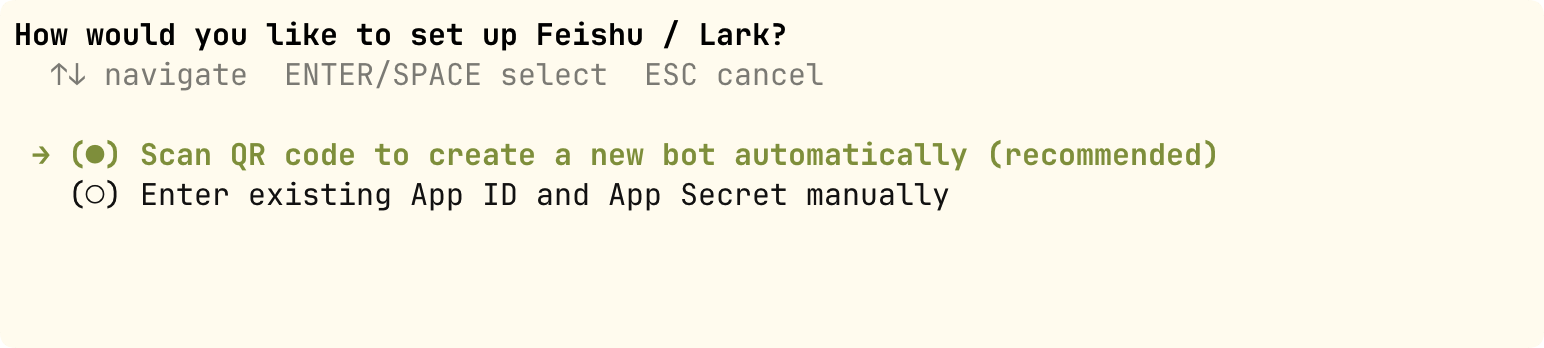
The wizard will guide you through configuring each platform: selecting the platform, filling in the Bot Token, setting the allowed user list, etc.
For example, after selecting Feishu, you can choose to create a bot by scanning a QR code or by using the APP ID:
Gateway Management Commands
Example
hermes gateway
# Install as a user-level system service (Linux systemd / macOS launchd)
hermes gateway install
# Linux: Install as a system service that starts on boot
sudo hermes gateway install --system
# Service Control
hermes gateway start # Start Service
hermes gateway stop # Stop Service
hermes gateway restart # Restart Service
hermes gateway status # View Service Status
Telegram Bot integration hands-on
Take Telegram as an example to complete a full Bot integration process.
Step 1: Create a Telegram Bot.
In Telegram, search for @BotFather, send the /newbot command, and set the Bot name and username as prompted.
BotFather will return a Bot API Token, formatted similar to:1234567890:ABCdefGHIjklMNOpqrsTUVwxyz。
Step 2: Configure the Hermes Gateway.
Example
# Telegram Platform Configuration
platforms:
telegram:
enabled: true
bot_token: "1234567890:ABCdefGHIjklMNOpqrsTUVwxyz"
# Optional: list of allowed user IDs (whitelist mode).
allowed_users:
- "123456789"
# Optional: whether it needs to be @mentioned in the group to respond
require_mention: true
# Optional: list of channels that do not require @mention
free_response_channels:
- "-1001234567890"
Step 3: Start and test.
Example
hermes gateway start
# Send a test message to your Bot in Telegram
For the initial integration, it is recommended to use whitelist mode (allowed_users), allowing only your own account to interact with the Agent, and then open it to others after verifying everything works properly.
Slash commands available within the platform
The following commands are available on any messaging platform:
| Command | Features |
|---|---|
| /new or /reset | Start new session |
| /model [name] | View or Switch Models |
| /retry | Retry Last Message |
| /undo | Undo Last Conversation Turn |
| /stop | Interrupt Current Task |
| /approve / /deny | Approve/Reject dangerous commands |
| /background <task> | Run Tasks in Background Sessions |
| /status | Show current session information |
| /usage | Display the Token usage for this session. |
| /voice [on/off/tts] | Control Voice Replies |
| /compress | Manually compress conversation context |
| /resume [title] | Resume a previously named session |
| /<skill-name> | Invoke any installed skill |
| /reload-mcp | Reload MCP server |
| /update | Update Hermes to the Latest Version |
| /help | Show all available commands |
Session Lifecycle
Session is the core concept in Hermes Gateway for managing conversations.
Understanding how Session works helps you configure appropriate session isolation policies and reset rules.
SessionSource: message source descriptor
Every message entering the Gateway carries a SessionSource, which records "where this message came from."
| Fields | Type | Description |
|---|---|---|
| platform | string | Platform name (telegram, discord, slack, etc.) |
| chat_id | string | Session identifier (private chat ID, group ID, channel ID) |
| chat_type | string | Session types: dm (direct message), group, channel, thread |
| user_id | string | Platform ID of the message sender |
| user_name | string | Display name of the message sender |
| thread_id | string | Forum topic ID (Telegram forum) / Discord thread ID |
| guild_id | string | Discord server ID (used for server isolation) |
Session Key generation rules
Session Key is a deterministic string composed of fields from the SessionSource.
It determines which messages belong to the same session. The format is as follows:
agent:main:{platform}:{chat_type}:{chat_id}:{thread_id}:{user_id}
Examples of Session Keys in different scenarios:
| Scenarios | Session Key |
|---|---|
| Telegram Private Chat | agent:main:telegram:dm:12345 |
| Telegram Group | agent:main:telegram:group:-10012345:user_abc |
| Telegram forum topics | agent:main:telegram:group:-10012345:thread_678:user_abc |
| Discord private chat | agent:main:discord:dm:12345 |
| Discord server channels | agent:main:discord:channel:12345:user_abc |
| Discord thread | agent:main:discord:thread:12345:thread_678 |
The Session Key generation rule is one of the most important Gateway configurations. If misconfigured, it may cause cross-talk between different users' sessions—two different people seeing each other's conversation content.
SessionEntry: active session record
Each Session Key corresponds to a SessionEntry, which records the session's metadata and state.
| Fields | Description |
|---|---|
| session_id | Session unique identifier, format: YYYYMMDD_HHMMSS_8-digit random hex |
| created_at | Session Creation Time |
| updated_at | Last activity time (used for idle timeout determination) |
| total_tokens | Cumulative token consumption |
| estimated_cost_usd | Cumulative cost estimate (USD) |
| suspended | Whether it has been forcibly suspended (/stop command or abnormal loop) |
| resume_pending | Whether it is waiting for recovery (restart recovery flag after a crash) |
Multi-User Isolation Policy
Multi-user isolation determines whether multiple users in the same group or channel share a single session or have their own independent sessions.
This configuration directly affects the user experience—a shared session means user A can see user B's conversation context.
Isolation Policy Configuration
| Configuration Item | Default value | Meaning |
|---|---|---|
| group_sessions_per_user | true | Each user in a group/channel has an independent session |
| thread_sessions_per_user | false | All users in the thread share the same session |
Behavior in Different Scenarios
| Scenarios | Default behavior | Description |
|---|---|---|
| Private Chat (DM) | Always independent | Private chat is always private and not configurable |
| Groups/Channels | Each user has an independent session | User A and User B each have independent session contexts in the same group |
| Thread (forum topic) | All users share a session | In Telegram forum topics and Discord threads, all participants share the same context |
System prompt changes for shared sessions
When the session is in shared mode (shared_multi_user_session = true), the system prompt will change:
- Instead of a fixed username, it prompts "Multi-user session—message prefix includes sender name"
- Each user message is prefixed with the sender's display name so the Agent knows who is speaking
- This design maintains the effectiveness of prompt caching (the system prompt does not change with the sender)
The default isolation policy (per-user for groups, shared for threads) is a best practice verified through extensive real-world use. Unless you have special requirements, it is not recommended to change it.
Gateway Security Configuration
User Access Control
By default, the gateway rejects all users not on the whitelist—This is the secure default setting for a Bot with terminal access privileges.
Configure allowed users (in the .env file):
Example
# User whitelist for specific platforms
TELEGRAM_ALLOWED_USERS=123456789,987654321
DISCORD_ALLOWED_USERS=123456789012345678
SLACK_ALLOWED_USERS=U012AB3CD,U012EF4GH
FEISHU_ALLOWED_USERS=ou_xxxxxxxx,ou_yyyyyyyy
WECOM_ALLOWED_USERS=user-id-1,user-id-2
TEAMS_ALLOWED_USERS=aad-object-id-1
# Whitelist that applies to all platforms
GATEWAY_ALLOWED_USERS=123456789,987654321
# Allow all users (not recommended for bots with terminal access)
GATEWAY_ALLOW_ALL_USERS=true
DM pairing (alternative to whitelist)
No need to manually configure user IDs. When a new user DMs the Bot, they will receive a one-time pairing code:
Example
# You approve the user's access
hermes pairing approve telegram XKGH5N7P
# View pending + approved user list
hermes pairing list
# Revoke a user's access permissions
hermes pairing revoke telegram 123456789
The pairing code expires after 1 hour, has rate limiting, and is generated using cryptographic random numbers.
Silent token
Used in group chats, Hooks, and automated workflows to make the Agent send no messages under specific conditions:
# Agent 回复中仅包含以下内容之一时,网关不会向平台发送任何消息:
[SILENT]
SILENT
NO_REPLY
NO REPLY
silence isDelivery decision, without affecting the session record—the reply is still stored in the session history, ensuring the conversation turn-taking logic works normally.
Session Reset Policy
Configure when the session automatically resets to prevent unlimited context growth:
Example
"reset_by_platform": {
"telegram": { "mode": "idle", "idle_minutes": 240 },
"discord": { "mode": "idle", "idle_minutes": 60 },
"slack": { "mode": "daily", "reset_hour": 4 }
}
}
| Policy | Default value | Description |
|---|---|---|
| daily | 4:00 AM | Reset session at a specific time each day |
| idle | 1440 minutes | Reset session after idle timeout |
| both | combination | Whichever triggers first resets the session |
Quick Reference for Common Commands
Example
hermes gateway setup # Interactive platform configuration
hermes gateway # Run in foreground (debug)
hermes gateway install # Install as user service
hermes gateway start / stop / restart # Service Control
hermes gateway status # View Service Status
# ─── User Pairing ────────────────────────────────────────────────
hermes pairing list # View Pairing List
hermes pairing approve <platform> <code> # Approve Pairing
hermes pairing revoke <platform> <user_id> # Revoke Access
# ─── SessioninsideSlash Commands ──────────────────────────────────────────
/new # Start a new session
/model [Name] # View or switch model
/retry # Retry the last message
/undo # Undo previous turn
/stop # Interrupt Current Task
/approve / /deny # Approve/Reject Dangerous Commands
/background <Task> # Run Task in Background
/status # Current Session Information
/usage # Token usage
/voice [on/off/tts] # Control Voice
/compress # Compress context
/resume [Title] # Restore Session
/<skill-name> # Invoke Skill
/reload-mcp # Reload MCP
/update # Update Hermes
/help # All Commands