Django forms
HTML forms are a classic way to achieve interactivity on websites. This chapter will introduce how to use Django to process form data submitted by users.
HTTP request
The HTTP protocol works in a "request-response" manner. When a client sends a request, it can attach data to the request. By parsing the request, the server can obtain the data sent by the client and provide specific services based on the URL.
GET method
In our previous project, create a search.py file to receive user requests:
/HelloWorld/HelloWorld/search.py file code:
Add the search_form.html form in the templates directory:
/HelloWorld/templates/search_form.html file code:
Modify the urls.py rules to the following form:
/HelloWorld/HelloWorld/urls.py file code:
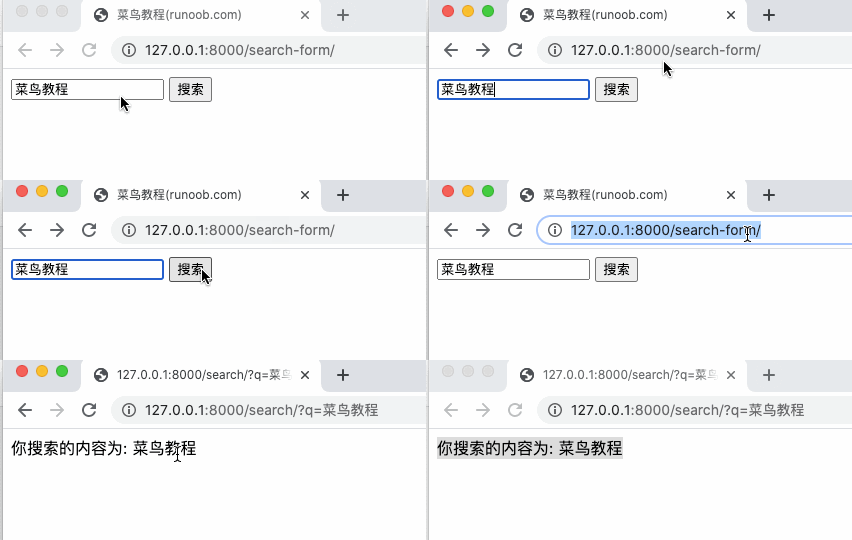
Access addresshttp://127.0.0.1:8000/search-form/And search, the results are as follows:
POST method
Above we used the GET method, and the view display and request processing are handled by two separate functions.
When submitting data, the POST method is more commonly used. Below we use this method, and use a single URL and handler function to both display the view and process the request.
We create post.html in templates:
The file code for /HelloWorld/templates/post.html:
At the end of the template, we add an rlt marker to reserve a position for the form processing result.
After the form there is also a{% csrf_token %}The tag. CSRF stands for Cross Site Request Forgery. This is a feature provided by Django to prevent disguised request submission. Forms submitted using the POST method must include this tag.
Create a new search2.py file in the HelloWorld directory and use the search_post function to handle POST requests:
/HelloWorld/HelloWorld/search2.py file code:
Modify the urls.py rules to the following form:
/HelloWorld/HelloWorld/urls.py file code:
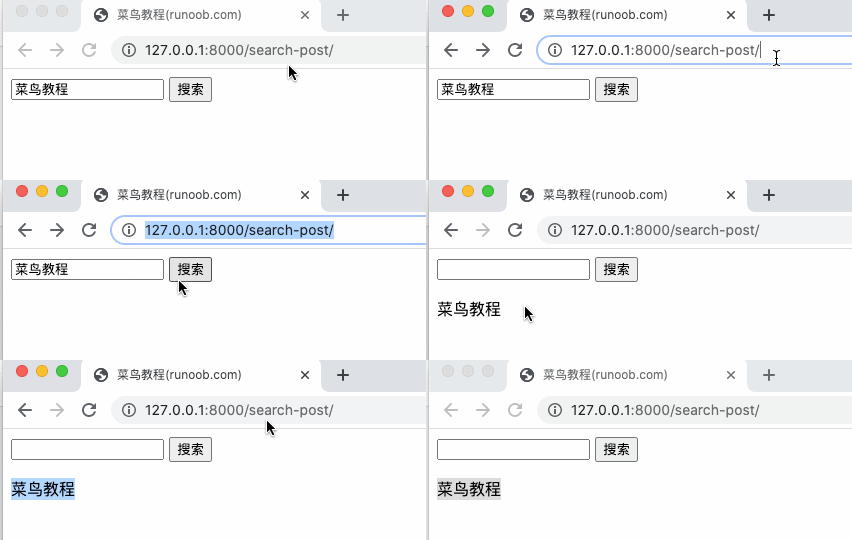
Visithttp://127.0.0.1:8000/search-post/The displayed results are as follows:
After completing the above example, our directory structure is:
HelloWorld
|-- HelloWorld
|   |-- __init__.py
|   |-- __init__.pyc
|   |-- search.py
|   |-- search.pyc
|   |-- search2.py
|   |-- search2.pyc
|   |-- settings.py
|   |-- settings.pyc
|   |-- testdb.py
|   |-- testdb.pyc
|   |-- urls.py
|   |-- urls.pyc
|   |-- views.py
|   |-- views.pyc
|   |-- wsgi.py
|   `-- wsgi.pyc
|-- TestModel
|   |-- __init__.py
|   |-- __init__.pyc
|   |-- admin.py
|   |-- admin.pyc
|   |-- apps.py
|   |-- migrations
|   |   |-- 0001_initial.py
|   |   |-- 0001_initial.pyc
|   |   |-- __init__.py
|   |   `-- __init__.pyc
|   |-- models.py
|   |-- models.pyc
|   |-- tests.py
|   `-- views.py
|-- db.sqlite3
|-- manage.py
`-- templates
    |-- base.html
    |-- hello.html
    |-- post.html
    `-- search_form.html
Request object
The first parameter of each view function is an HttpRequest object, like the example() function below:
from django.http import HttpResponse

def example(request):
    return HttpResponse("Hello world")
The HttpRequest object contains some information about the current request URL:
|
Property |
Description |
|
path |
The full path of the requested page, not including the domain name — for example, "/hello/". |
|
method |
The string representation of the HTTP method used in the request. Uppercase representation. For example: if request.method == 'GET': |
|
GET |
A dictionary-like object containing all HTTP GET parameters. See the QueryDict documentation. |
|
POST |
A dictionary-like object containing all HTTP POST parameters. See the QueryDict documentation. It is possible that the server receives an empty POST request. That is, the form submits a request via the HTTP POST method, but the form may have no data. Therefore, you cannot use the statement if request.POST to determine whether the HTTP POST method is used; you should use if request.method == "POST" (see the method attribute in this table). Note: POST does not include file-upload information. See the FILES attribute. |
|
REQUEST |
For convenience, this attribute is a combination of the POST and GET attributes, but it has a special behavior: it looks for the POST attribute first, then the GET attribute. It is modeled after PHP's $_REQUEST. For example, ifGET = {"name": "john"} andPOST = {"age": '34'},Then REQUEST["name"] value ofYes"john", REQUEST["age"]value ofYes"34". It is strongly recommended to use GET and POST, because these two attributes are more explicit, and the code written is easier to understand. |
|
COOKIES |
A standard Python dictionary object containing all cookies. Both keys and values are strings. |
|
FILES |
A dictionary-like object containing all uploaded files. Each key in FILES is the value of the name attribute in the <input type="file" name="" /> tag. Each value in FILES is also a standard Python dictionary object, containing the following three keys:
Note: FILES only contains data when the request method is POST and the <form> on the request page has the enctype="multipart/form-data" attribute. Otherwise, FILES is an empty dictionary. |
|
META |
A dictionary containing all available HTTP header information. For example:
These headers in META are prefixed withHTTP_The part before the colon (:) is the Key, and the part after is the Value, for example:
|
|
user |
is a django.contrib.auth.models.User object, representing the currently logged-in user. If the accessing user is not currently logged in, user will be initialized as an instance of django.contrib.auth.models.AnonymousUser. You can use the user's is_authenticated() method to determine whether the user is logged in:
if request.user.is_authenticated():
    # Do something for logged-in users.
else:
    # Do something for anonymous users.
This attribute is only available when AuthenticationMiddleware in Django is activated. |
|
session |
The only read-write attribute, a dictionary object representing the current session. This attribute is only available when Django's session support is enabled. |
|
raw_post_data |
The raw HTTP POST data, unparsed. This is useful for advanced processing. |
The Request object also has some useful methods:
| Methods | Description |
|---|---|
| __getitem__(key) | Returns the key-value from GET/POST, taking POST first, then GET. Raises KeyError if the key does not exist. This allows us to access the HttpRequest object using dictionary syntax. For example,request["foo"]Equivalent to先request.POST["foo"] then request.GET["foo"]ofoperation. |
| has_key() | Check whether request.GET or request.POST contains the Key specified by the parameter. |
| get_full_path() | Returns the request path including the query string. For example, "/music/bands/the_beatles/?print=true" |
| is_secure() | Returns True if the request is secure, that is, if it was made via HTTPS. |
QueryDict object
In the HttpRequest object, the GET and POST attributes are instances of the django.http.QueryDict class.
QueryDict is a custom dictionary-like class used to handle the situation where a single key corresponds to multiple values.
QueryDict implements all standard dictionary methods. It also includes some special methods:
| Methods | Description |
|---|---|
|
__getitem__ |
There is one difference from standard dictionary handling: if a key corresponds to multiple values, __getitem__() returns the last value. |
|
__setitem__ |
Sets the value list (a Python list) for the specified key. Note: it can only be called on a mutable QueryDict object (that is, a copy of a QueryDict object created via copy()). |
|
get() |
If a key corresponds to multiple values, get() returns the last value. |
|
update() |
The parameter can be a QueryDict or a standard dictionary. Unlike the standard dictionary's update method, this method adds dictionary items, rather than replacing them:
>>> q = QueryDict('a=1')

>>> q = q.copy() # to make it mutable

>>> q.update({'a': '2'})

>>> q.getlist('a')

 ['1', '2']

>>> q['a'] # returns the last

['2']
|
|
items() |
There is one difference from the standard dictionary's items() method: this method uses the single-value logic of __getitem__():
>>> q = QueryDict('a=1&a=2&a=3')

>>> q.items()

[('a', '3')]
|
|
values() |
There is one difference from the standard dictionary's values() method: this method uses the single-value logic of __getitem__(): |
In addition, QueryDict also has some methods, as shown in the following table:
| Methods | Description |
|---|---|
|
copy() |
Returns a copy of the object, internally implemented using Python's standard library copy.deepcopy(). This copy is mutable — that is, the values of the copy can be changed. |
|
getlist(key) |
Returns all values corresponding to the parameter key, as a Python list. If the key does not exist, returns an empty list. It's guaranteed to return a list of some sort.. |
|
setlist(key,list_) |
Set the value of key to list_ (unlike __setitem__()). |
|
appendlist(key,item) |
Adds an item to the internal list associated with the key. |
|
setlistdefault(key,list) |
There is one difference from setdefault: it accepts a list as the parameter rather than a single value. |
|
lists() |
There is one difference from items(): it returns all values for the key as a list, for example:
>>> q = QueryDict('a=1&a=2&a=3')

>>> q.lists()

[('a', ['1', '2', '3'])]
|
|
urlencode() |
Returns a string formatted as a query string (for example: "a=2&b=3&b=5"). |