C# Namespace
namespaceIts design purpose is to provide a way to separate a set of names from other names. The name of a class declared in one namespace does not conflict with the name of the same class declared in another namespace.
Let us take an example from a computer system: a folder (directory) can contain multiple folders, and within each folder, file names cannot be identical, but files in different folders can have the same name.
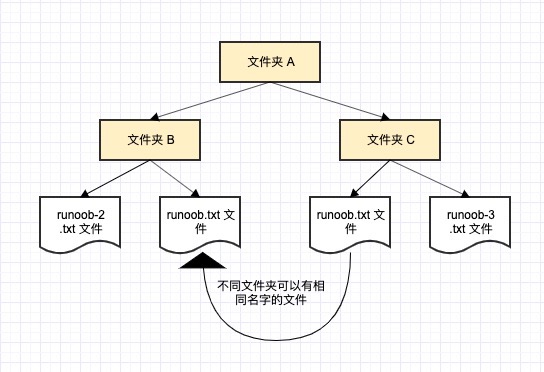
Define namespace
A namespace is defined using the keywordnamespaceStart, followed by the name of the namespace, as shown below:
{
// Code declaration
}
To call a function or variable that supports the namespace version, the namespace name is placed in front, as shown below:
namespace_name.item_name;
The following program demonstrates the use of namespaces:
Example
namespace first_space
{
class namespace_cl
{
public void func()
{
Console.WriteLine("Inside first_space");
}
}
}
namespace second_space
{
class namespace_cl
{
public void func()
{
Console.WriteLine("Inside second_space");
}
}
}
class TestClass
{
static void Main(string[] args)
{
first_space.namespace_cl fc = new first_space.namespace_cl();
second_space.namespace_cl sc = new second_space.namespace_cl();
fc.func();
sc.func();
Console.ReadKey();
}
}
When the above code is compiled and executed, it produces the following results:
Inside first_space
Inside second_space
usingKeywords
usingThe keyword indicates that the program uses names from a given namespace. For example, in our program we useSystemnamespace, where the class Console is defined. We can simply write:
Console.WriteLine ("Hello there");
We can write the fully qualified name, as follows:
System.Console.WriteLine("Hello there");
You can also useusingnamespace directive, so that you do not need to add the namespace name in front when using it. This directive tells the compiler that the following code uses names from the specified namespace. The following code demonstrates the application of namespaces.
Let us rewrite the above example using the `using` directive:
Example
using first_space;
using second_space;
namespace first_space
{
class abc
{
public void func()
{
Console.WriteLine("Inside first_space");
}
}
}
namespace second_space
{
class efg
{
public void func()
{
Console.WriteLine("Inside second_space");
}
}
}
class TestClass
{
static void Main(string[] args)
{
abc fc = new abc();
efg sc = new efg();
fc.func();
sc.func();
Console.ReadKey();
}
}
When the above code is compiled and executed, it produces the following results:
Inside first_space
Inside second_space
Nested namespace
Namespaces can be nested, that is, you can define another namespace within a namespace, as shown below:
namespace namespace_name1
{
   // 代码声明
   namespace namespace_name2
   {
     // 代码声明
   }
}
You can use the dot (.) operator to access members of nested namespaces, as shown below:
Example
using SomeNameSpace;
using SomeNameSpace.Nested;
namespace SomeNameSpace
{
public class MyClass
{
static void Main()
{
Console.WriteLine("In SomeNameSpace");
Nested.NestedNameSpaceClass.SayHello();
}
}
// Nested namespace
namespace Nested
{
public class NestedNameSpaceClass
{
public static void SayHello()
{
Console.WriteLine("In Nested");
}
}
}
}
When the above code is compiled and executed, it produces the following results:
In SomeNameSpace
In Nested
other extensions