Docker architecture
Docker architecture is based on a client-server model, which includes multiple key components to ensure efficient building, management, and running of containerized applications.
Docker's architectural design enables developers to easily package an application with all its dependencies into a portable container and run it consistently across different environments.
Docker uses a client-server (C/S) architecture pattern, using remote APIs to manage and create Docker containers.
Docker containers are created from Docker images.
The relationship between containers and images is similar to the relationship between objects and classes in object-oriented programming.
| Docker | Object-Oriented |
|---|---|
| Container | Object |
| Image | Class |
Docker architecture diagram
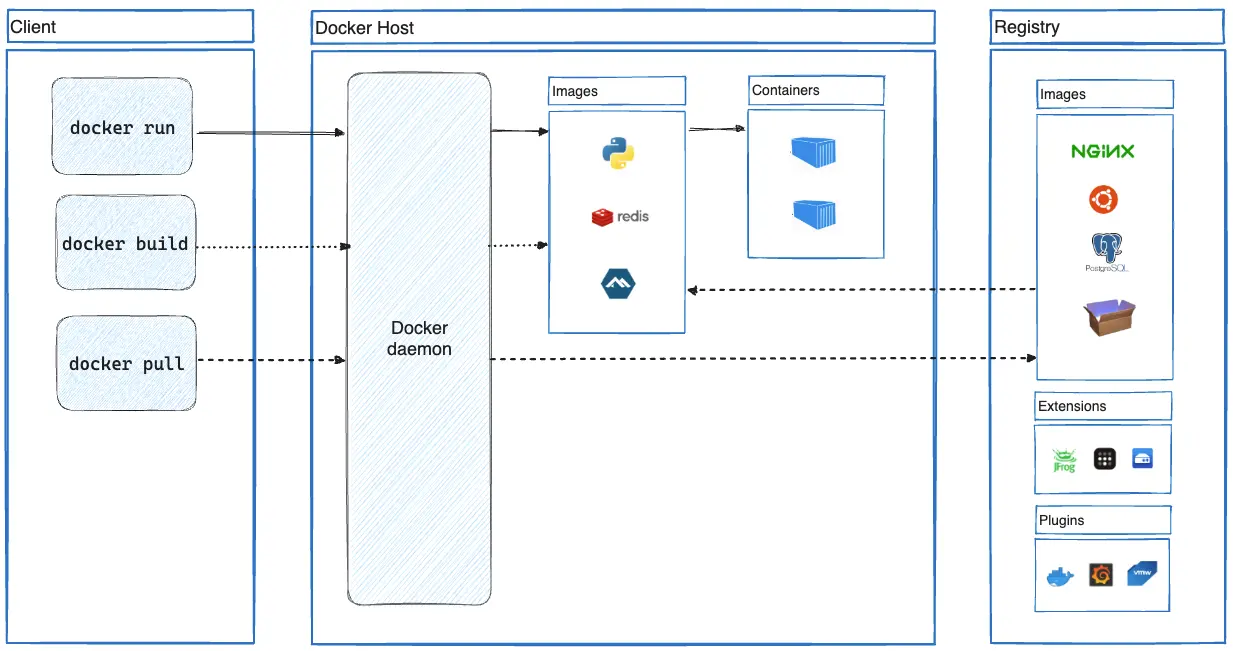
Workflow of Docker architecture
- Build image: Use
DockerfileCreate image. - Push image to registry: Upload the image to Docker Hub or a private registry.
- Pull image: through
docker pullPull image from registry. - Run container: Use the image to create and start a container.
- Manage containers: Use Docker client commands to manage running containers (e.g., view logs, stop containers, check resource usage, etc.).
- Network and Storage: Containers connect to each other through Docker networks, and data is persisted through Docker volumes or bind mounts.
Next, let's delve into Docker's core components and their working mechanisms.
1, Docker Client
The Docker client is the command-line interface (CLI) for users to interact with the Docker daemon. It is the primary way users interact with the Docker system. Users issue commands through the Docker CLI, which are sent to the Docker daemon, and the daemon executes the corresponding operations.
- Features: Allows users to communicate with the Docker daemon using commands, such as creating containers, building images, viewing container status, etc.
- Interaction mode: The Docker client communicates with the Docker daemon through the REST API or Unix sockets. The commonly used command-line tool is
docker, through which users can issue various Docker operation commands.
Common commands:
docker run: Run a container.docker ps: List running containers.docker build: Build a Docker image.docker exec: Execute commands in the container.
2, Docker Daemon
The Docker daemon (usuallydockerd) is the core of the Docker architecture, responsible for managing container lifecycles, building images, distributing images, and other tasks.
The daemon typically runs as a background process, waiting for API requests from the Docker client.
Features:
- Start and stop containers.
- Build, pull, and push images.
- Manage container networking and storage.
- Start, stop, view container logs, etc.
- Communicate with Docker registries to manage image storage and distribution.
The Docker daemon listens for requests from Docker clients and executes these requests through the Docker API. The daemon is responsible for managing Docker objects such as containers and images, and starts containers, deletes containers, modifies container configurations, etc., according to the request parameters.
Start the Docker daemon (usually started automatically):
sudo systemctl start docker
3, Docker Engine API
The Docker Engine API is a RESTful interface provided by Docker, allowing external clients to communicate with the Docker daemon. Through this API, users can perform various operations such as starting containers, building images, viewing container status, etc. The API provides an HTTP request interface and supports cross-platform calls.
Features:
- Send HTTP requests to the Docker daemon to manage containers and images.
- Provides a RESTful interface, allowing interaction with Docker programmatically.
Can be accessed throughcurlor other HTTP clients to access the Docker Engine API. For example, query the current Docker daemon version:
curl --unix-socket /var/run/docker.sock http://localhost/version
4, Docker Containers
A container is Docker's execution environment; it is a lightweight, standalone, and executable software package. Containers are started from Docker images and contain everything needed to run an application—from operating system libraries to application code. At runtime, containers share the operating system kernel with other containers and the host machine, but the file systems and processes of containers are isolated from each other.
Features:
- Provides an isolated runtime environment to ensure consistent behavior of applications across different environments.
- Containers are temporary and are usually destroyed after tasks are completed.
The container lifecycle is managed by the Docker daemon. Containers can run anywhere because they do not depend on the underlying operating system configuration; all runtime dependencies are already packaged in the image.
Start a container:
docker run -d ubuntu
5, Docker Images
A Docker image is a read-only template for containers. Each image contains the operating system, runtime, libraries, environment variables, and application code required for the application to run. Images are static, and users can start containers from an image.
Features:
- Images are the basis for building containers; each container uses an image when it is instantiated.
- Images are read-only. When different containers use the same image, the filesystem layers in the containers are independent.
Docker images can bedocker pullpulled from Docker Hub or a private registry, or can bedocker buildBuild from Dockerfile.
Pull the Ubuntu image:
docker pull ubuntu
6. Docker Registries
A Docker registry is a place for storing Docker images. The most commonly used public registry isDocker Hub. Users can download images from Docker Hub and upload their own images to share with others. In addition to public registries, users can also deploy their own private Docker registries to manage images within an enterprise.
Features:
- Store Docker images.
- Provide functions for uploading and downloading images.
Docker Hub provides a large number of official and community-maintained images, such as Ubuntu, Nginx, MySQL, etc.
Push the image to Docker Hub:
docker push <username>/<image_name>
7, Docker Compose
Docker Compose is a tool for defining and running multi-container Docker applications. With Compose, users can use a singledocker-compose.ymlA configuration file defines multiple containers (services), and these containers can be started with a single command. Docker Compose is mainly used for developing, testing, and deploying multi-container applications.
Features:
- Define and run an application composed of multiple containers.
- Configure the application's services, networks, and volumes through a YAML file.
Create a simpledocker-compose.ymlfile to configure an application containing a web service and a database service:
version: '3'
services:
  web:
    image: nginx
    ports:
      - "8080:80"
  db:
    image: mysql
    environment:
      MYSQL_ROOT_PASSWORD: example
Start all services defined by Compose:
docker-compose up
8, Docker Swarm
Docker Swarm is a cluster management and scheduling tool provided by Docker. It allows multiple Docker hosts (nodes) to be organized into a cluster, and uses the Swarm cluster management tool to schedule and manage containers. Swarm can implement features such as container load balancing, high availability, and auto-scaling.
Features:
- Manage multi-node Docker clusters.
- Manage the deployment and scaling of containers through the scheduler.
Initialize a Swarm cluster:
docker swarm init
9, Docker Networks
Docker networks allow containers to communicate with each other and connect with the outside world. Docker provides multiple network modes to meet different needs, such asbridgeNetwork (default),hostNetworks andoverlaynetworks, etc.
Features:
- Manage network communication between containers.
- Supports different network modes to adapt to requirements in different scenarios.
Create a custom network and connect a container to the network:
docker network create my_network
docker run -d --network my_network ubuntu
10. Docker Volumes
Docker volumes are a data persistence mechanism that allows data to be shared between containers and is independent of the container lifecycle. Unlike the container filesystem, the contents of a volume are not lost when the container is destroyed, making it suitable for applications such as databases that require persistent storage.
Features:
- Allow data sharing between containers.
- Ensure data persistence, independent of the container lifecycle.
Create and mount a volume:
docker volume create my_volume
docker run -d -v my_volume:/data ubuntu
other extensions